The Hive
A small team of AI agents that lives in a folder on your computer and works on your projects while you do other things.
You talk to a lead in a chat. Workers build each piece in a sandbox, the Hive runs the project's tests itself on the exact commit, a reviewer reads that commit, and the change merges on GitHub. After every merge the Hive measures the project again and reverts the change if it made things worse.
Install
Linux only for now: new releases aren't built for macOS or Windows while the self-improvement loop is the focus (issue #564), and their installers say so. In a terminal:
curl -fsSL https://hive.ihsan.cc/v1/install.sh | shThen run hive.
How to use it
The first run
It checks for git, Claude Code and the GitHub CLI and offers their own logins. It asks where to live (Enter for ~/hive) and for a GitHub repository (Enter makes a small private demo project). Then it opens the control center with the lead's chat, and from then on the Hive starts with your machine.
Every day
hive- the control center: chats, dashboard, what's waiting on you
hive ask "..." --wait- ask the lead from a shell
hive status- what it's doing
hive doctor- check the install and sandbox
hive shutdown- stop it;
hivestarts it again
Closing the control center never stops work.
Updates
The Hive looks for a new release when it starts and every few hours while it runs, and updates itself when one is out. hive update does it now, and Settings turns it off. After an update the Hive shows what changed, and every release's notes are on the releases page.
Uninstall
macOS and Linux:
curl -fsSL https://hive.ihsan.cc/v1/uninstall.sh | shWindows:
irm https://hive.ihsan.cc/v1/uninstall.ps1 | iexYour folder and its projects are left alone.
What this edition does
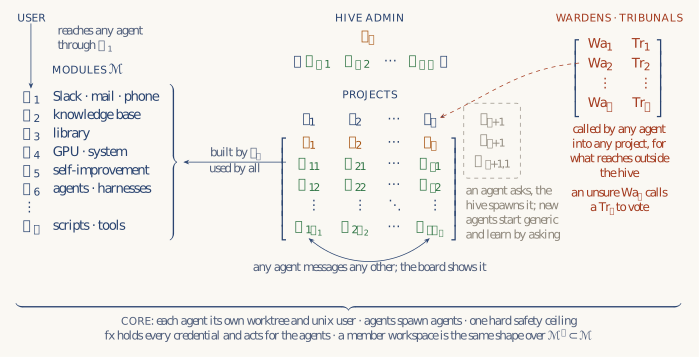
The essay and the diagram describe the Hive's design. What you install here is the standalone edition: one program for one person on one machine. Where the two differ, this is what the program does.
- Sandbox
- On Linux and in WSL 2, each agent runs in its own Linux namespaces. It sees its own checkout and a read-only copy of the system, and reaches the internet only through a proxy that refuses local addresses. The macOS sandbox is written but hasn't been tested. Where no sandbox works, agents don't start unless you choose to run them without one, and then they can reach everything your account can.
- Credentials
- Your GitHub login never enters the sandbox, and only the Hive itself pushes and merges. Agents do get a short-lived token for their model on each turn, because Claude Code and Codex can't run without one.
- Tests
- The Hive runs the tests in a fresh sandboxed copy of the exact commit, with the test command from the main branch, so a worker can't report a pass or change the command. A worker can still change the tests themselves as part of its change, unless you mark their folder protected in the project's settings; then the change waits for an approval.
- Review
- A reviewer that can only read checks the exact commit before it merges. A small change to docs alone merges on its tests.
- Modules
- The pipeline from ask to merge and the default modules are compiled into the program. You change the prompts and roles they use, and add modules of your own. A module that runs a program runs as you, outside the sandbox, so it starts only after a review run has read its code.
- Not here yet
- Slack, mail or phone out of the box, other people's workspaces on the same machine, a separate system user for each agent, and sharing a GPU.